 box
box debug stops at your breakpoint on a real Mac and prints the variables→
Paste one line into your agent. See it run on iOS and Android.
Paste the line below into Claude Code, Codex or Cursor. Your agent builds the app on a real Mac (Android on an emulator), runs it on a simulator and shows you the screenshot. No Mac or Xcode on your side
Paste this into Claude Code, Codex or Cursor
Set up box with https://xenoci.com/setupRun claude in your app folder and paste the line at the prompt.
Or install the plugin: claude plugin marketplace add Xeno-CI/box-cli, then claude plugin install box@xenoci
Run codex in your app folder, or open Codex in your editor, and paste the line.
Or install the skill plugin: codex plugin marketplace add Xeno-CI/box-cli, then codex plugin add box@xenoci
Open your app folder, press Cmd I (Ctrl I on Linux and Windows) for the Agent panel, and paste the line.
Or add the MCP server: npx -y @xenoci/box mcp
Your agent installs box and gives you a link to sign in with GitHub. $10 of credit to start, prepaid
On a phone? Open this on the computer where your agent runs.
Your stack, built on a real Mac
- Xcode
- Swift
- SwiftUI
- UIKit
- Objective-C
- Swift Package Manager
- XcodeGen
- CocoaPods
- Tuist
- fastlane
- Flutter
- React Native
- Expo
Agents that ran box from their own shellClaude CodeCodex
box runs your iOS build on a real Mac, so your agent never needs one.
Build
Compile errors on your own files and lines
box uploads only the files that changed (.gitignore respected, .env never sent), a Mac unpacks them next to your last build, builds, runs your tests on a simulator and sends the results back, one log line per step. When the build breaks, the error points at your local path, with the lines around it.
- Simulator builds and tests, with a passed and failed count
- Your workspace and build cache stay, so the next build is fast
- Exit code 1 means fix the code; the agent knows what to do next
Cache
The next build is faster, with nothing to set up
box keeps each project’s workspace and build cache between jobs on its own. There is no cache step to add to your workflow and no cache to pay for or clean up.
15.9sfirst build
→10.8safter a one-line change
- 7 s → 2 scompiling on the Mac
- 70 → 3Swift files compiled
- 1 fileuploaded
box: upload: 65 files checked, 1 new (4 KB), .gitignore respected, .env never sent
box build command, from upload to the last log line.See
See the app your agent just built
Screenshots come back as PNG files, the screen can be recorded, and a running app opens in your browser with a live view only your GitHub account can see.
- Light or dark, in any language:
--dark --locale ar box screenshot --recordsaves the run as screen.mp4- Tap, type and swipe with
box uiwhile the app is open
live view
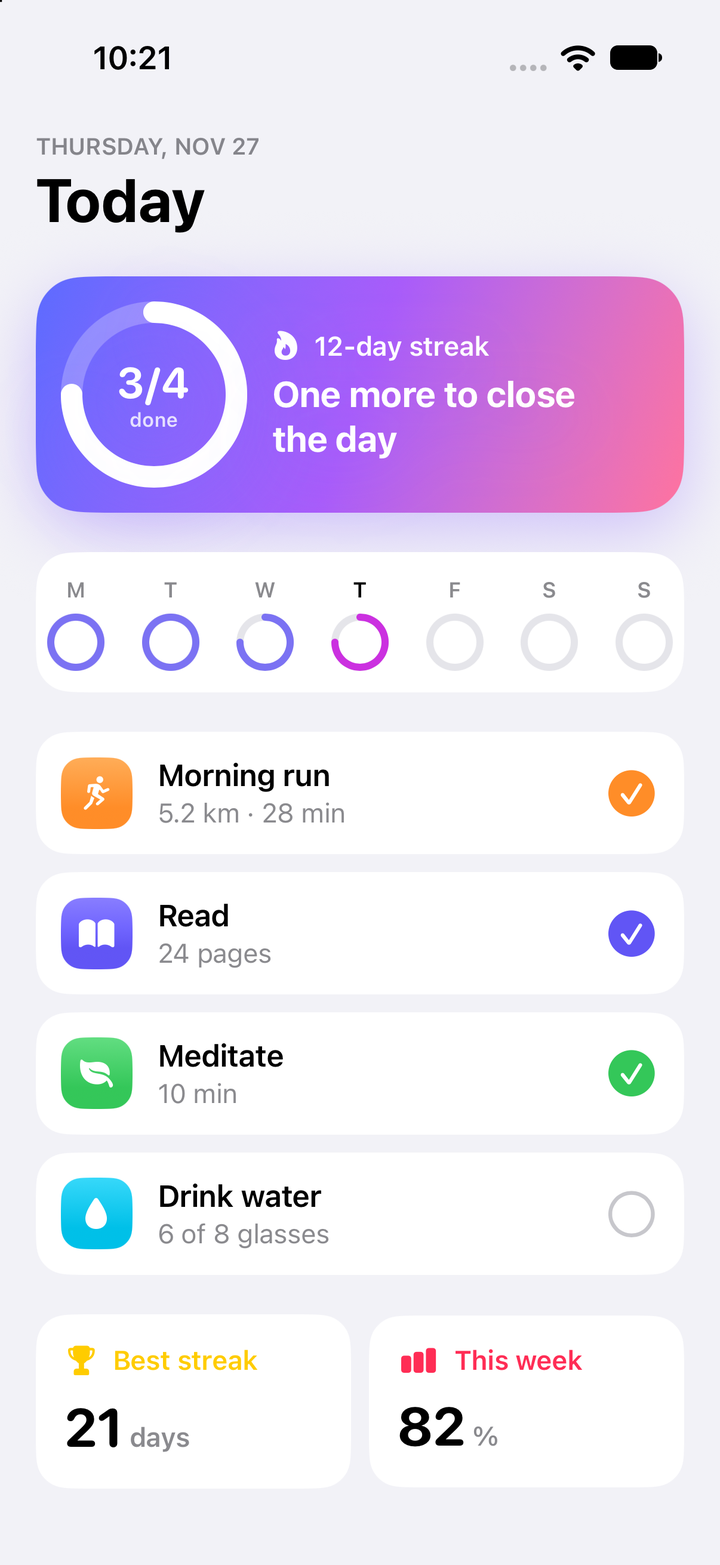
screen.png saved
Debug
Breakpoints and variables, read by your agent
box debug launches the app under LLDB on the Mac, taps through to the code if it needs to, and prints the stack and variables at every stop.
- Break on
File.swift:42or a function name, up to 10 - Print the variables you name, or every local
- Also an MCP tool, so the agent can call it directly
Pay
$0.05 per minute of build and test time, every started minute
Prepaid in US dollars with $10 of credit to start. 1 to 60 seconds on the Mac is one minute, 61 to 120 is two. Upload, queue and Mac start are free. Android: one size, 4 vCPU / 16 GB, $0.02 per minute, emulator boot time is free.
- No subscription and no daily usage limit
- A job that fails because of us costs nothing
box usage --csvexports every job and what it cost
Everything else
Everything box can do
One command each, from your agent or your own shell. Cards marked See the output open to what box printed on a real run.
Build
Only changed files go up; errors point at your file and line
box buildSee the output
box: 1 compile error(s):
App/Module0.swift:2:19: cannot convert value of type 'String' to specified type 'Int'
      1 | import Foundation
>     2 | let broken: Int = "x"
      3 | struct Module0 {
box: bj_5WO8cgwGaPXkXTit failed, 60s billed
Test
Runs your tests on a fresh simulator and counts what passed and failed
box testSee the output
box: results: saved to ./.box/out/bj_f-P-JW-6hWjR-OnA/ (test-summary.json, test.xcresult.zip)
box: tests 3 passed, 0 failed
box: bj_f-P-JW-6hWjR-OnA succeeded, 180s billed
Screenshot and video
Light or dark, in any language, as a PNG and a screen.mp4
box screenshot --dark --recordSee the output
box: results: saved to ./.box/out/bj_uuc8DqNjyHR1EVK9/ (screen.mp4, screen.png)
box: bj_uuc8DqNjyHR1EVK9 succeeded, 120s billed
Drive the app
Keep it open, then describe, tap, type, swipe, press a button or grab the screen
box run && box ui tap --label AddLive view
Watch the simulator in your browser; only your GitHub account can open it
box runDebug
LLDB on iOS: stop at breakpoints and print the stack and variables
box debug -b ContentView.swift:42Device build
An unsigned Release build for a device, saved as device-build.zip (iOS)
box build --device-buildWeb in Safari
Your page in Safari on a Mac and on an iPhone simulator: two pictures, page errors, failed requests
box web https://your.siteShell on the Mac
Run one command in your project folder on the Mac
box exec -- pod installFlutter, React Native, Expo
Run the tool’s own setup through box exec, then build as usual
box exec -- flutter pub getStart over
Empty this project’s build cache and source copy
box purge --yesJobs and logs
List your jobs, follow a log again, stop or cancel one
box jobsSee the output
bj_5WO8cgwGaPXkXTit    build      app        failed     2026-11-26 23:09 UTC     60s
bj_D1B9nyTkYyzG69Gn    screenshot app        succeeded  2026-11-26 23:07 UTC    120s
bj_f-P-JW-6hWjR-OnA    test       app        succeeded  2026-11-26 23:05 UTC    180s
Usage as a spreadsheet
Every job and charge, or every balance change, as an Excel-ready file
box usage --csvSee the output
job_id,kind,project,status,started_at,ended_at,billed_seconds,amount_usd
bj_RxfsLDFlJcYfGkhA,build,app,succeeded,2026-11-27T01:14:05+09:00,2026-11-27T01:15:21+09:00,120,0.10
bj_PxyhHD2mwDcCDedL,screenshot,app,succeeded,2026-11-27T01:45:23+09:00,2026-11-27T01:50:18+09:00,300,0.25
MCP server
Your agent calls build, test, screenshot, debug and the rest as tools
box mcpAgent setup
Once per machine: the box skill, notes and MCP server for Claude Code and Codex in every project
box setupOur failure, $0
A job that fails because of us costs nothing
box usage --csvNo subscription
Prepaid credit, no plan to pick and no daily usage limit
box balance --csvGet started
One line. Your agent does the setup.
Paste it into your agent. It installs box, signs you in with GitHub and runs your first build.
Paste this into Claude Code, Codex or Cursor
Set up box with https://xenoci.com/setupRun claude in your app folder and paste the line at the prompt.
Or install the plugin: claude plugin marketplace add Xeno-CI/box-cli, then claude plugin install box@xenoci
Run codex in your app folder, or open Codex in your editor, and paste the line.
Or install the skill plugin: codex plugin marketplace add Xeno-CI/box-cli, then codex plugin add box@xenoci
Open your app folder, press Cmd I (Ctrl I on Linux and Windows) for the Agent panel, and paste the line.
Or add the MCP server: npx -y @xenoci/box mcp
Your agent installs box and gives you a link to sign in with GitHub. $10 of credit to start, prepaid
On a phone? Open this on the computer where your agent runs.
Each name is a starter project box built and launched on a simulator. Apple tools are shown by name only, with plain drawn tiles; other product names and logos are trademarks of their owners, shown only to say what box builds and works with.